ofpr.info Game server FAQ
Get the needed addons pack here and unpack it into your Operation Flashpoint main folder (example: C:\program files\codemasters\operation flashpoint\. There will be a new folder created called "@BWMod" (or another name depending of the featured mod) .
After this you have to make a copy of your OFP shortcut (it should be called FLASHPOINTBETA.exe or something like that).
Now right click on the second link you just created, get into properties and add -nomap -mod=@BWMod in the line "target" (should be something like ""C:\Program files\codemasters\Operation Flashpoint\FLASHPOINTBETA.EXE" -nomap -mod=@BWMod"). Of course put the name of the currently featured mod folder if it is not BWMod!
You always have to start the game with this new link if you want to play on the Gameserver, in order to load the needed addons.
Start the game and click on "Multiplayer". Now you are in the MP servers browser. At the bottom of the screen check if "Internet" is written next to "Adress", if there is "LAN" instead, click on it in order to change it to "Internet".

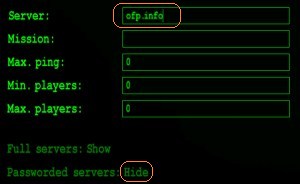
Click on "Filter", type "ofpr.info" into the filter and click on "Passworded servers" to have "Hide", like this:
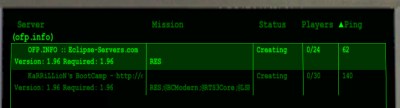
After clicking on the OK button you see a small list of filtered servers like on the picture below. You just need then to double click on the ofpr.info :: Eclipse-Servers.com in order to connect to the server.
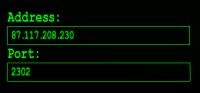
There is also a second method to join the server. Click on "remote" button and type 87.117.208.230 into the "Adress" line and 2302 into the "Port" line like on the screenshot below, and press enter.
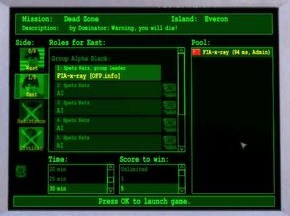
If there is an admin you don't have to do very much. Just click on a slot you want to play (The slot shows information about your position in the team, the kind of soldier it is and the group name like "Alpha Black"), like on the picture below.
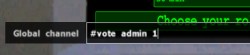
If you are alone on the server you have to vote yourself as admin. Do this by writing #vote admin 1 into the chat (default key for the chat is the "!" key), like this:
Once you are admin (look the previous question to know how to do so), write #missions into the chat dialog and you will get into the missions menu.
There you can choose a mission and its realism mode (on our server "recruit" is with 3rd person view and "veteran" is without).
Once you have chosen a mission wait for players to join/get into slots (unless you want to play alone), and start the mission by clicking on "OK".
#missions = get into mission browser menu
#restart = restart the mission
#reassign = get back into lobby
#userlist = show PlayerIDs and ping
#kick PLAYERNAME or PLAYERID = kick this player
All these commands have to be typed into the chat-line (default key for the chat is the "!" key).
Most likely you haven't installed all required Addons. Check the hint in the game to find out which addon is missing. All required addons are here.
Check also if you have an up to date patched version of the game, the server is currently using V 1.96.
You can be also auto kicked if your custom sounds or your custom face are too big (you will have a hint message telling you what is the limit). The last option is that you have been banned before for cheating or killing your team members intentionally, or that there is a game in progress on the server and an admin decided to lock it temporarily.
- What is the Ping limit?
For a "player vs player" game (CTF, C&H etc) a ping above 200 will create some lag, and your enemy will die some time after being shot, which is quite frustrating because meanwhile he will still be able to kill you. For a Cooperative mission the limit should be around 400.
- A yellow/red box appears down in the right corner!?
A yellow box shows that you have a bad connection to the server and you will maybe loose connection in the next time. The red box shows that you have lost the connection.
- I joined but a game is in progress, how can I know when it stops?
The best solution is to install the Certa's OFPWatch program. It's a monitoring utility for Operation Flashpoint which will tell you whenever a selected server goes from playing to debriefing with a sound notification, so you don't have to alt+tab back and forth to check every minute in order to not miss the next game!

You can download this utility here, once you have installed it you just need to click "add", enter the server's IP adress and port and click "ok".
- Is it possible to speak with the others players on the game server using a microphone/headset?
Yes as we are using a Team Speak server. Team Speak II is a voice over net communication program allowing you to talk directly to the others players using it, it allows you to coordinate better whilst playing cooperative missions (or another kind of mission) on the game server.
So you just need to Install this team speak 2 client, launch the Team Speak 2 program, click on "Connection" then "Quick connect" and type ts.ofpr.info:1000 in server adress, and click "Connect".